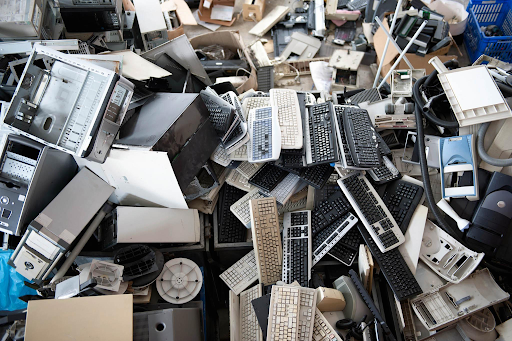
Businesses often accumulate different types of IT equipment as they upgrade systems, relocate offices, or replace outdated technology. Computers, servers, networking devices, printers, storage drives, and other electronics can become difficult to manage when stored together. Preparing these items before selling them in bulk makes the process more organized and helps sellers communicate what they have available. A planned approach supports accurate records and makes it easier to separate reusable devices from damaged or obsolete assets. Working with an IT scrap buyer can help businesses understand the steps involved in evaluating and collecting surplus equipment.
- 01. Start by Creating an Asset Inventory
- 02. Separate Equipment According to Its Condition
- 03. Group Assets by Equipment Type
- 04. Desktop Computers and Workstations
- 05. Servers and Networking Hardware
- 06. Printers and Printing Supplies
- 07. Hard Drives and Storage Devices
- 08. Gaming Consoles and Accessories
- 09. Protect Business Data Before Selling Equipment
- 10. Prepare Details for a Bulk Sale
- 11. Arrange Collection and Keep Equipment Accessible
- 12. Final Checklist Before Selling IT Assets
- 13. Conclusion
- What is Link Exchange in SEO: A Complete Guide to Know

- The Art of the Hook: How to Write Enticing Introductions in Blogging and Essay Writing

- How a Website Audit Helps Improve User Experience and SEO Together

- What SEO Content Tips Top Digital Marketing Firms Always Follow

- How to Rank Your Blog in Google’s Top 10 Search Results

- Top SEO Trends for 2026: Strategies to Refine Your Content

Start by Creating an Asset Inventory
Before moving equipment into storage or arranging a sale, prepare a list of the items your business intends to sell. Record each category, quantity, manufacturer, model where available, and general condition. This information gives you a clearer picture of the assets involved and helps prevent items from being overlooked during preparation.
Separate computers, monitors, printers, servers, routers, switches, and storage devices into distinct categories. If you have several units of the same type, group them together and record their quantities. A simple spreadsheet can keep these details accessible and make communication with a potential buyer more straightforward.
Separate Equipment According to Its Condition
Not every retired IT asset will be in the same condition. Some devices may still function, while others might have missing components, visible damage, or operational faults. Sorting equipment by condition helps create a more accurate inventory and allows you to describe each group clearly when requesting a quotation.
Avoid assuming that damaged equipment has no resale or scrap value. The assessment depends on the item, its components, and the buyer’s purchasing criteria. Instead, record known issues honestly and keep uncertain items in a separate group until their condition can be established.
Group Assets by Equipment Type
Once the inventory is ready, organize the physical items into identified groups. This step is particularly useful when a business has accumulated equipment from different departments, branches, or technology upgrades.
-
Desktop Computers and Workstations
Group desktop computers, workstations, and their associated components together. Record the quantity and note whether essential parts, such as memory, storage drives, or power supplies, are present. Keep keyboards, mice, and other accessories in labelled containers rather than placing them loosely among heavier equipment.
-
Servers and Networking Hardware
Store servers, routers, networking switches, and related equipment in separate groups. Record model details where possible, especially when multiple generations of hardware are involved. Keep cables and removable components organised so they can be identified without searching through mixed boxes.
-
Printers and Printing Supplies
Separate printers by type and keep compatible accessories or toner cartridges clearly labelled. Note whether printers are complete, damaged, or missing parts. Store loose supplies securely to prevent leaks or accidental damage to surrounding equipment during handling.
-
Hard Drives and Storage Devices
Collect hard disk drives, solid-state drives, and other storage devices separately. Record quantities and identify the equipment they came from when practical. Because storage devices may contain confidential information, keep them secure until the organization has completed its approved data-handling process.
-
Gaming Consoles and Accessories
If the inventory includes PlayStation consoles or other gaming equipment, create a dedicated category for consoles, controllers, cables, and games. Record the model and general condition of each group. Keeping accessories together can simplify counting and help provide a clearer description of the items being offered for sale.
Protect Business Data Before Selling Equipment
Organizing equipment also involves protecting company information. Computers, servers, and storage devices may contain customer records, employee details, financial documents, or internal files. Before preparing these assets for sale, follow your organization’s data security policy and ensure that authorized personnel handle the information stored on them.
Use approved data-erasure methods or physical destruction procedures when required by your policies. Keep storage devices secure until the process is complete, and maintain records of the actions taken. Do not assume that deleting files or resetting a computer automatically removes all recoverable information.
Prepare Details for a Bulk Sale
A well-prepared inventory makes it easier to discuss a bulk sale with potential buyers. Once equipment has been sorted, compile the quantities, categories, model details, and known condition issues into a single document.
When contacting an IT scrap buyer, share accurate information about the available equipment and explain whether the collection involves a few categories or a mixed inventory.
Arrange Collection and Keep Equipment Accessible
After discussing the inventory and receiving a quotation, prepare the equipment for collection. Choose a secure, accessible storage area where items can be counted and retrieved without unnecessary movement. Keep heavier equipment stable, protect delicate components, and avoid stacking devices in ways that could cause damage or create handling risks.
Businesses looking for the best IT scrap buyer should compare the buyer’s accepted equipment categories, quotation process, and collection arrangements before proceeding. Confirm which items are included in the proposed sale, how the final evaluation will be handled, and when payment is expected.
Final Checklist Before Selling IT Assets
Before arranging collection, review the inventory and confirm that all equipment is prepared.
- Verify quantities: Match the physical items against the inventory list.
- Check labels: Make sure categories and model details are easy to identify.
- Secure sensitive data: Complete the approved data-handling process.
- Separate accessories: Keep cables, controllers, and removable components organized.
- Confirm collection details: Agree on the equipment included, evaluation process, and payment arrangements.
Conclusion
Organizing IT assets before a bulk sale involves more than gathering unused electronics in one place. Categorizing devices, documenting their condition, protecting confidential data, and preparing clear inventory records can simplify the process. Careful planning also helps businesses communicate their requirements and manage equipment collection with fewer complications.
For businesses seeking the best IT scrap buyer in Dubai, IT Scrap Buyer offers purchasing services for various IT equipment and electronic scrap, including computers, servers, networking devices, and gaming consoles. With collection services across the UAE and a process involving quotation, evaluation, and payment, IT Scrap Buyer provides a practical option for individuals and businesses looking to sell surplus equipment in an organized manner.




Reader Discussion 0
No reader comments yet.
Be the first to share your thoughts or ask a question about this article below.